New Employee Onboarding
Onboarding new hires thoroughly and correctly while creating a great first impression is crucial, especially in environments like hair salons where turnover rates can be high. Effective onboarding sets the tone for an employee's entire career with us, impacting their job satisfaction, performance, and retention. A well-structured onboarding process familiarizes new hires with the company culture, values, and expectations, helping them integrate smoothly into their roles. It also provides them with the necessary training and resources to succeed, boosting their confidence and productivity from the start. Additionally, a positive onboarding experience fosters a sense of belonging and loyalty, reducing turnover rates and ultimately benefiting the salon's overall success and reputation. Ensuring thorough and correct onboarding is even more critical considering that many employees tend to leave within the first 30 days if they feel unsupported or undervalued.
Our onboarding checklist is specific to each category of New Hires we typically see, giving them a more customized onboarding experience. This attention to detail fosters a positive first impression, setting the stage for long-term engagement and retention. For example, a New Graduate straight from cosmetology school will need additional training and support like the Great Clips Boot Camp. All stylists should be welcomed with a small gift and logo swag as detailed in the checklists. These are just a few of the details we think make a difference and set us apart.
Additional Pre-Onboarding Best Practices
Assign a Welcome Buddy before Day 1 who will answer questions and check in throughout the first week.
Verify they have completed all required paperwork and know how to log into Paychex before their first day.
Add the new hire to BAND (if appropriate) and introduce them to the team before they arrive.
Review their schedule for the first two weeks so training shifts and trainers are confirmed.
First Day Best Practices
Give them a complete salon tour, including break area, restroom, back room, and where supplies are kept.
Introduce every team member by name and explain each person's role.
Review the training plan so they know exactly what to expect during their first week.
Schedule a quick end-of-day check-in to answer questions and celebrate their first day.
First Week Follow-Up
Manager checks in daily for the first week with a simple: "What's going well? What questions do you have? Is there anything you need?"
Celebrate small wins and recognize progress publicly with the team.
Help Aids
All New Hires Complete These Items!
-
Interview Slides
These are the slides that can be used during the interview process to give candidates an overview of our company. It also helps give professionalism to you as an interviewer. Please do not feel like you need to use every single slide in it’s entirety or with great detail. We don’t want the candidate bored and feeling like they didn’t get to talk. Use the slides that seem relevant to that particular candidate and skip what seems unnecessary.
-
Employment Application
This is an electronic version of the Stevens Employment Application. It is designed for an employee to fill out while the Manager or GM is interviewing them at the same time.
The bottom box MUST have a start date and rate of pay entered by the Manager or GM. If this information is unknown (example, stylist isn’t sure about exact start date, or Manager doesn’t know base rate), you should NOT complete this until you have that information.
If the stylist was referred to us by another employee this MUST be listed on the application in order for Becki to start the referral bonus. You do not need to email Becki additionally as long as this was noted on the application.
It is NOT designed to be filled out entirely by the New Hire without a Manager present.
-
Login to Paychex, Add Direct Deposit Info, Sign Onboarding Docs
After the payroll department receives your application they will enter your information in to our system and you will receive a text and email prompting you to set up your Paychex account.
If you can’t find the welcome email, simply download the Paychex app and create an account, or go to Paychexflex.com and create an account. As long as you use the same email address and phone number from your application they will find and link the account to us!
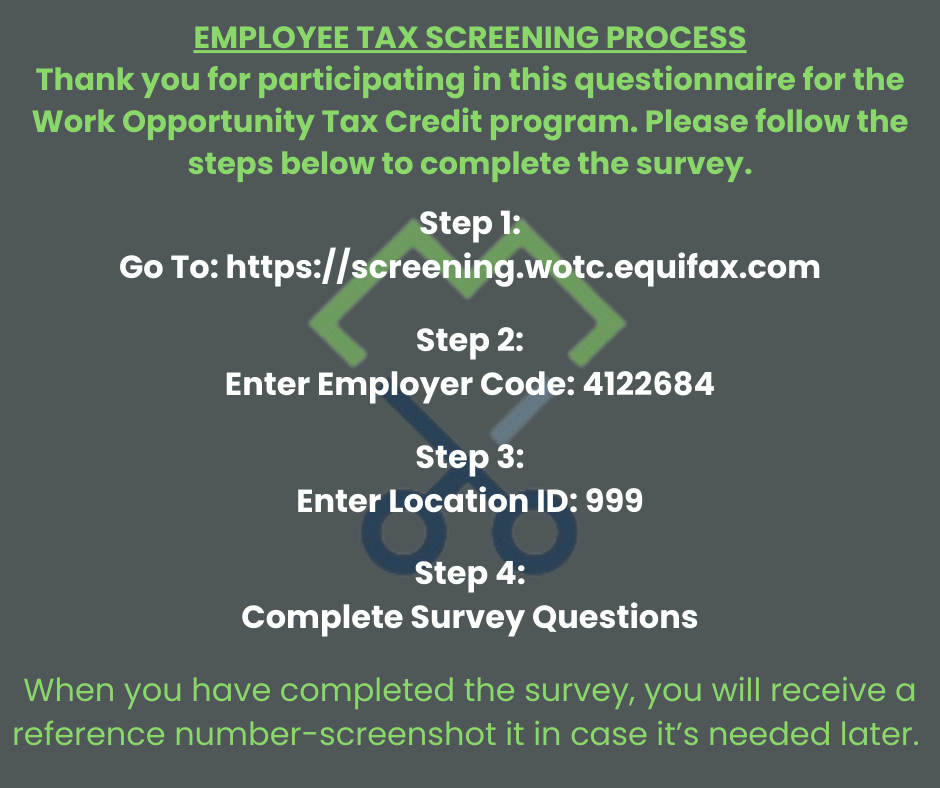
Please make sure you immediately complete every single task assigned to you including the WOTC tax screening adding two forms of ID, and the other Onboarding docs.
If they still need help, and don’t want to use click to chat there is a phone number option. They could call 866-804-5693, dial ‘1’ to enter extension, then 7102501.
One thing to do before calling in, please verify with them to make sure the employee information you have for them is correct. This includes first and last name, SSN, date of birth and home zip code.
-
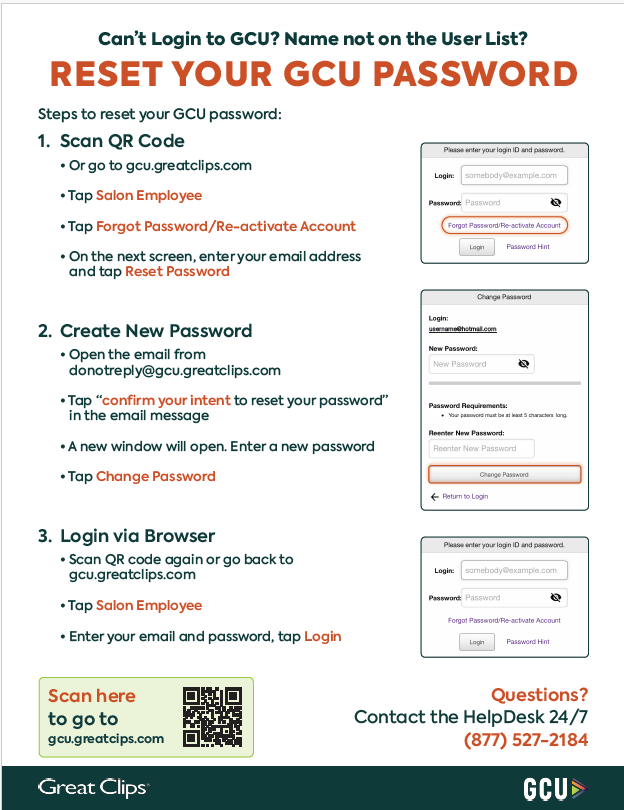
Add to Employee App WITH GLOBAL ID/Ensure Access to GCU
Managers can add the new hire to the Employee App with personal contact information and rate of pay. It is very important to include an email address and Global ID. This will automatically trigger a GCU account to be created and assigns Academy.
If you are unable to gain access to GCU you need to contact the Helpdesk at 1-877-527-2184.
-
Salon Tour and Housekeeping
Give the new hire a tour of where to find tools, combs, and your standard cleaning and sanitation procedures.
Print and fill out a Wishlist from the Google Drive so you know a few of their favorite things. Wishlist Link
Send them an invite to join Band! You can click Invite directly from the Band app or use THIS INVITE LINK .
Add their Birthday/Anniversary to your salon list so you know when to celebrate them.
Add their Phone Number to your phone list, make sure they have everyone’s Phone Numbers, Band, etc. way to contact co workers.
-
Decorate a Station and Welcome Them In
Take a picture of the employee and shoutout on Band with a welcome post.
Have a small gift or treat, card etc from their Wishlist on their station ($5).
Encourage them to join join Stevens Great Facebook group as well.
-
Inform New Hire of Zoom Benefits Orientation
Every Thursday at 10:30 am Sam hosts a 45 minute benefits and perks orientation covering everything from student loan reimbursement to medical insurance qualifiers. ALL NEW HIRE EMPLOYEES are required to attend even if they think they do not want benefits. The Google Meet information is on the Band Event Calendar for easy access or listed below:
Google Meet joining call link: https://meet.google.com/apz-vhtp-dfx
If they need a refresher on what was covered they can watch a recording of the Benefits Orientation from the link below..
-
Sign Up New Hire for In Person GM Meeting
All new hires are required to meet with a GM Regional Support leader to go over their first 4 weeks of metrics and review what used to be taught as an in person Orientation. When filling out the Manager Completion Checklist below, please indicate when the employee will have been on the floor for 4 weeks and is anticipated to meet with their GM.
-
Sign Up Employee for Academy
Most employees have to take GCU Academy, both the independent learning modules and the live Zoom session. THIS MOST BE COMPLETED WITHIN 30 DAYS OF HIRE, NO EXCEPTIONS. It is best to complete before the employee starts on the floor.
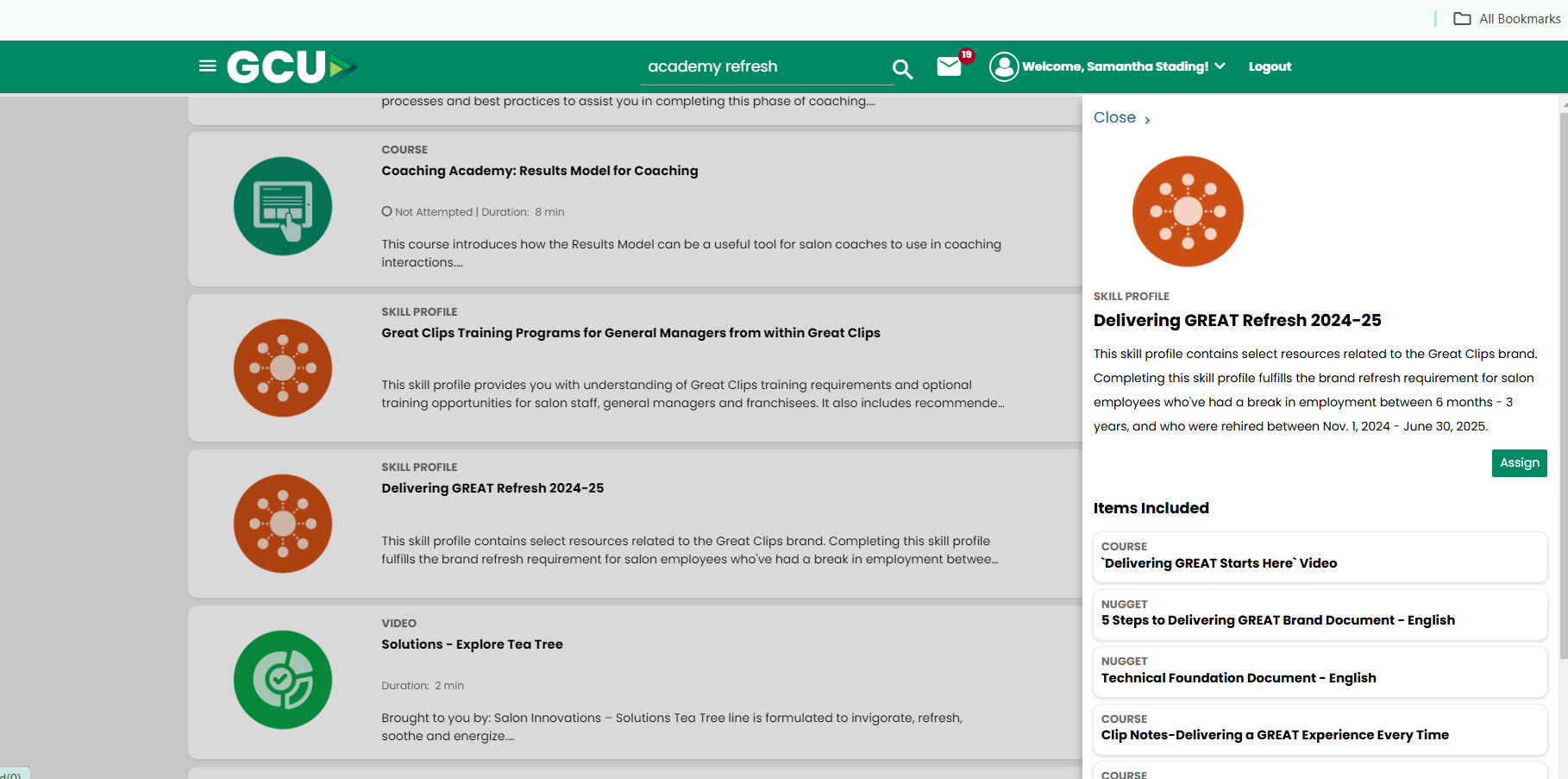
The only change to this is if the employee is a rehire to Great Clips that had previously completed Academy. If they were rehired and it has been between 6 months-3 years since working for Great Clips they are only required to complete the Academy Refresh module (30 minutes in GCU). THIS MOST BE COMPLETED WITHIN 30 DAYS OF HIRE, NO EXCEPTIONS.
More information on Academy and training can be found on THIS TRAINING PAGE .
New Graduate Onboarding
-
New Graduate Toolkit Ordering
All new graduates earn a toolkit when they complete Academy, and have their license activated. Managers can use this form to be printed out and called in to Salon Innovations, or filled out and emailed in with the SKUs listed as an example.
-
New Stylist Bootcamp
A technical training three day bootcamp is hosted by the Great Clips co-op market trainer Quarterly. This is a resource available for all new grads to sharpen skills. 2026 dates and signup will be posted on Band as they become available.
-
Haircut Certification
All New Graduates must complete the haircut certification process as detailed on GCU.